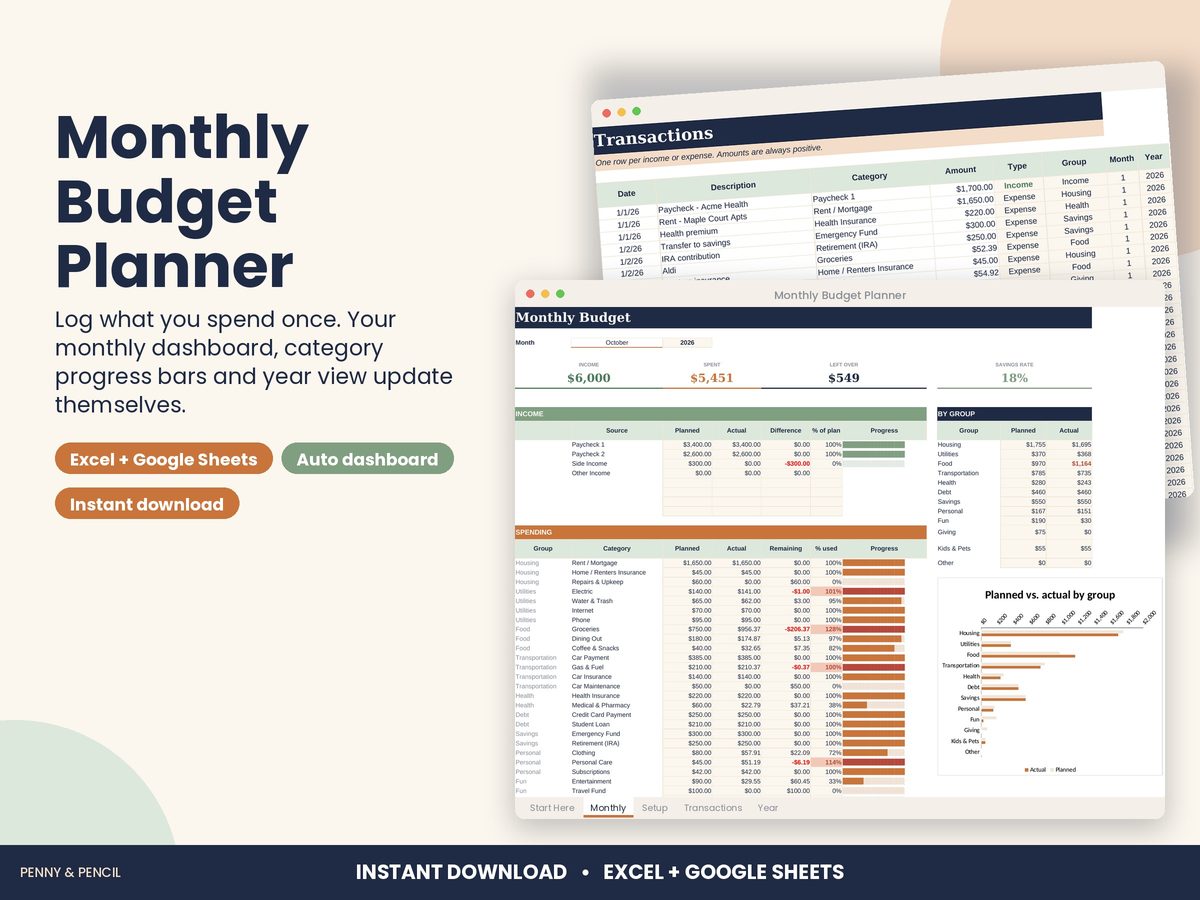
Expense tracker spreadsheet
The simplest way to see where money goes is to write down every expense for a month or two. A spreadsheet that sorts and totals those entries for you makes the habit much easier to keep.
The Monthly Budget Planner has one log tab: date, description, category and amount, with 600 rows for a full year. Categories come from a dropdown you control (up to 40, plus 8 income sources). It totals each category for the month you pick, with a planned amount and a progress bar that turns red when you go over, and a year-at-a-glance tab with monthly averages and an income vs. spending chart.
It works in Excel and Google Sheets and comes with a filled-in example. It is an organizing tool, not financial advice.
Buy Monthly Budget Planner on Etsy · $14.00What you get
You get two files, a blank template and a filled-in example, plus a Start Here guide. Open them in Microsoft Excel, or upload them to Google Drive and open them with Google Sheets (free). You type in the input cells; the formulas, totals and charts update themselves.
Tips
- Log spending daily for the first two weeks to build the habit.
- Start with 10 to 15 categories; add more only if you need them.
- Review the year view at the end of each month.